> ## Documentation Index
> Fetch the complete documentation index at: https://docs.trysiren.io/llms.txt
> Use this file to discover all available pages before exploring further.
# HTTP Node
This node is only available in Advanced Workflow
Use the **HTTP Node** to call an external API during your workflow — for example, to fetch user data, verify an action, or enrich notifications with information from another service.
 ### Configuration Options
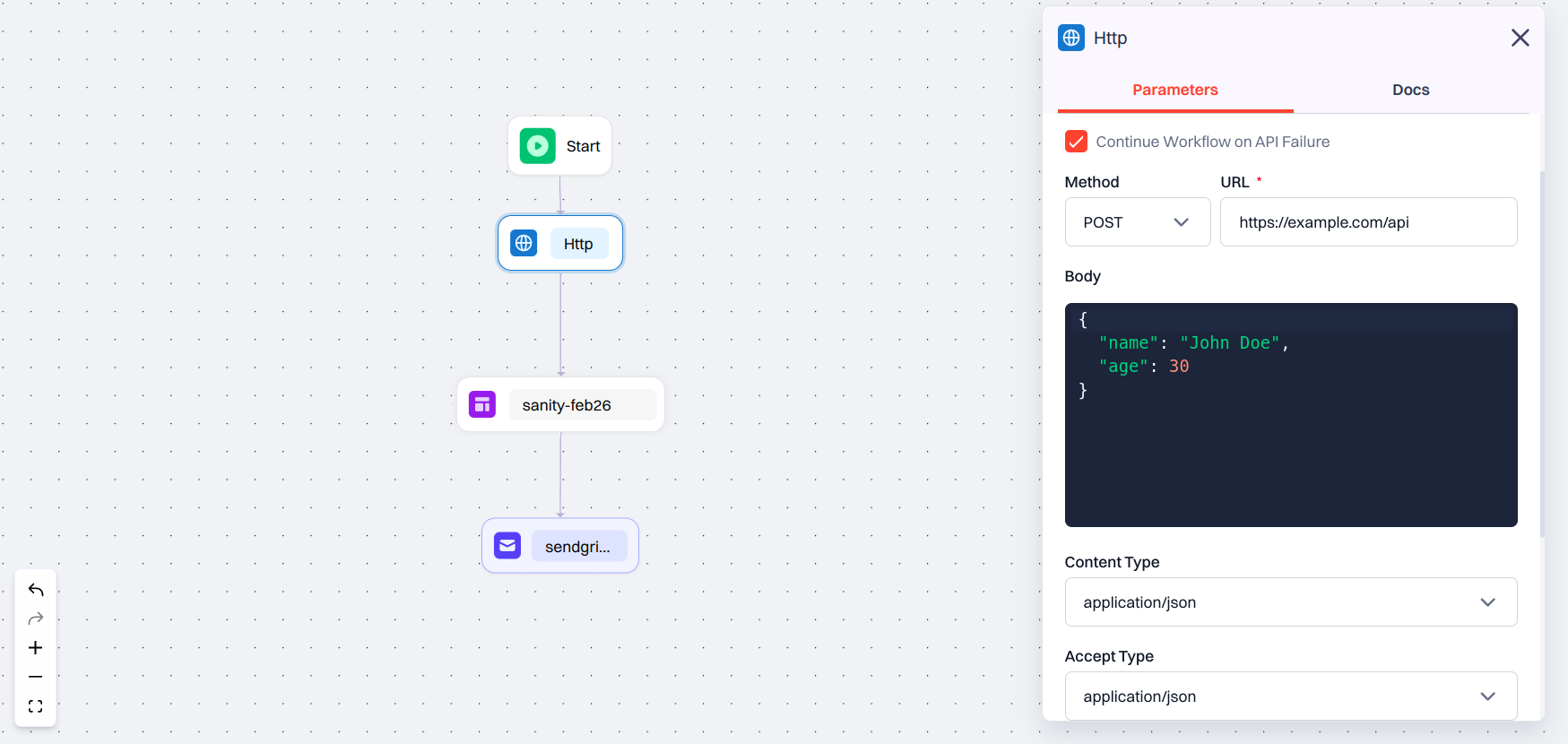
When you add an HTTP Node, you will see the following fields:
* **Reference Name**: A label used to reference this API’s response in later parts of the workflow.
* **Continue Workflow on API Failure**: If checked, the workflow continues even if the API call fails. Useful for optional or non-blocking requests.
* **Method**: Choose the type of HTTP request from the following options: `GET`, `POST`, `PUT`, `PATCH`, `DELETE`, `OPTIONS`, `HEAD`.
* **URL**: Enter the **API endpoint link** you want to call.
* **Body**: Required for methods like `POST`, `PUT`, or `PATCH`. You can insert variables using JSON path.
* **Content Type**: Specifies the format of the request body: `application/json`, `text/plain`, `text/html`.
* **Accept Type**: Defines what response format you expect: `application/json`, `text/plain`, `text/html`.
* **Timeouts**
* **Connection Timeout** – Time (in milliseconds) to wait for a connection to establish.
* **Read Timeout** – Time (in milliseconds) to wait for the response after the connection is open.
* **Headers**: Add custom headers to the request using key-value pairs.
> ### Example
>
> Let’s say you want to check if a user passed a fraud check before sending them a transaction alert.
> Here’s how you might configure the HTTP Node:
>
> * **Reference Name**: Reference name that is generated
> * **Method**: `POST`
> * **URL**: `https://api.example.com/verify`
> * **Body**:
>
> ```json theme={null}
> {
> "userId": "${workflow.data.user_id}",
> "phone": "${data.phone_number}"
> }
> ```
### Configuration Options
When you add an HTTP Node, you will see the following fields:
* **Reference Name**: A label used to reference this API’s response in later parts of the workflow.
* **Continue Workflow on API Failure**: If checked, the workflow continues even if the API call fails. Useful for optional or non-blocking requests.
* **Method**: Choose the type of HTTP request from the following options: `GET`, `POST`, `PUT`, `PATCH`, `DELETE`, `OPTIONS`, `HEAD`.
* **URL**: Enter the **API endpoint link** you want to call.
* **Body**: Required for methods like `POST`, `PUT`, or `PATCH`. You can insert variables using JSON path.
* **Content Type**: Specifies the format of the request body: `application/json`, `text/plain`, `text/html`.
* **Accept Type**: Defines what response format you expect: `application/json`, `text/plain`, `text/html`.
* **Timeouts**
* **Connection Timeout** – Time (in milliseconds) to wait for a connection to establish.
* **Read Timeout** – Time (in milliseconds) to wait for the response after the connection is open.
* **Headers**: Add custom headers to the request using key-value pairs.
> ### Example
>
> Let’s say you want to check if a user passed a fraud check before sending them a transaction alert.
> Here’s how you might configure the HTTP Node:
>
> * **Reference Name**: Reference name that is generated
> * **Method**: `POST`
> * **URL**: `https://api.example.com/verify`
> * **Body**:
>
> ```json theme={null}
> {
> "userId": "${workflow.data.user_id}",
> "phone": "${data.phone_number}"
> }
> ```