> ## Documentation Index
> Fetch the complete documentation index at: https://docs.trysiren.io/llms.txt
> Use this file to discover all available pages before exploring further.
# SMS Template
The SMS template editor in Siren allows you to create and manage text messages for SMS delivery. You can customize your messages with dynamic content and configure delivery settings.
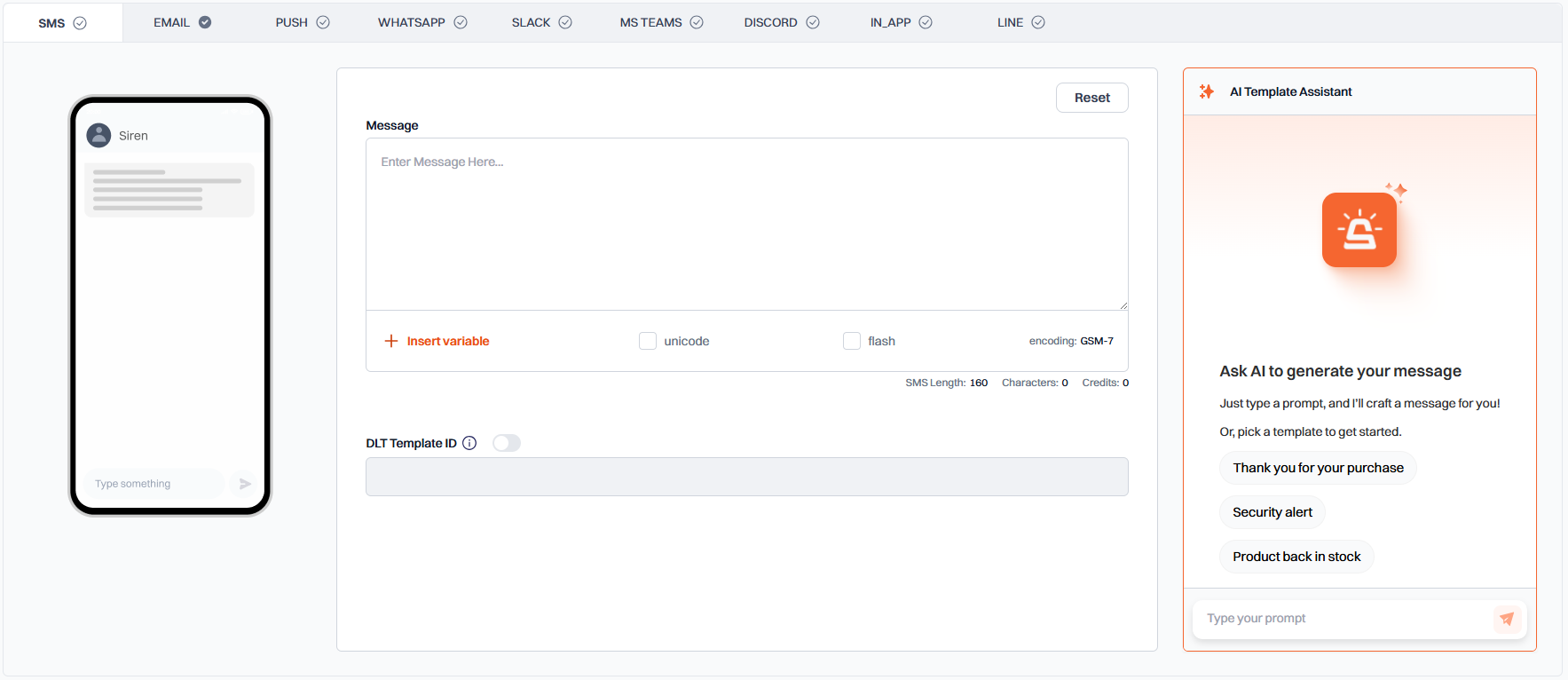 ## Message Configuration
* **Message Content**: Enter your SMS content in the message field
* **Insert Variable**: Add dynamic content to your message using the variable button
* **Unicode**: Check this box if your message contains non-ASCII characters
* **Flash**: Check this box to send as a flash SMS (appears directly on screen)
* Toggle the switch to enable DLT Template ID
* Enter your DLT Template ID in the provided field
Unique SMS Template ID can be obtained from DLT portal.
Standard SMS messages are limited to 160 characters.
## Best Practices
* Keep messages concise and to the point
* Test your template with different variable values
* Be aware of character limits when including variables
* Ensure compliance with local SMS regulations
## Message Configuration
* **Message Content**: Enter your SMS content in the message field
* **Insert Variable**: Add dynamic content to your message using the variable button
* **Unicode**: Check this box if your message contains non-ASCII characters
* **Flash**: Check this box to send as a flash SMS (appears directly on screen)
* Toggle the switch to enable DLT Template ID
* Enter your DLT Template ID in the provided field
Unique SMS Template ID can be obtained from DLT portal.
Standard SMS messages are limited to 160 characters.
## Best Practices
* Keep messages concise and to the point
* Test your template with different variable values
* Be aware of character limits when including variables
* Ensure compliance with local SMS regulations